If you’re looking to grow your business, generate qualified leads, and drive conversions, Facebook Lead Ads might be your best ally. These ads come with built-in forms, making it easier than ever to capture information from potential customers without them ever leaving the platform.
In this blog post, we’ll walk you through how to generate leads using forms with Facebook Ads — from setup to strategy — so you can start collecting high-quality leads today.
What Are Facebook Lead Ads?
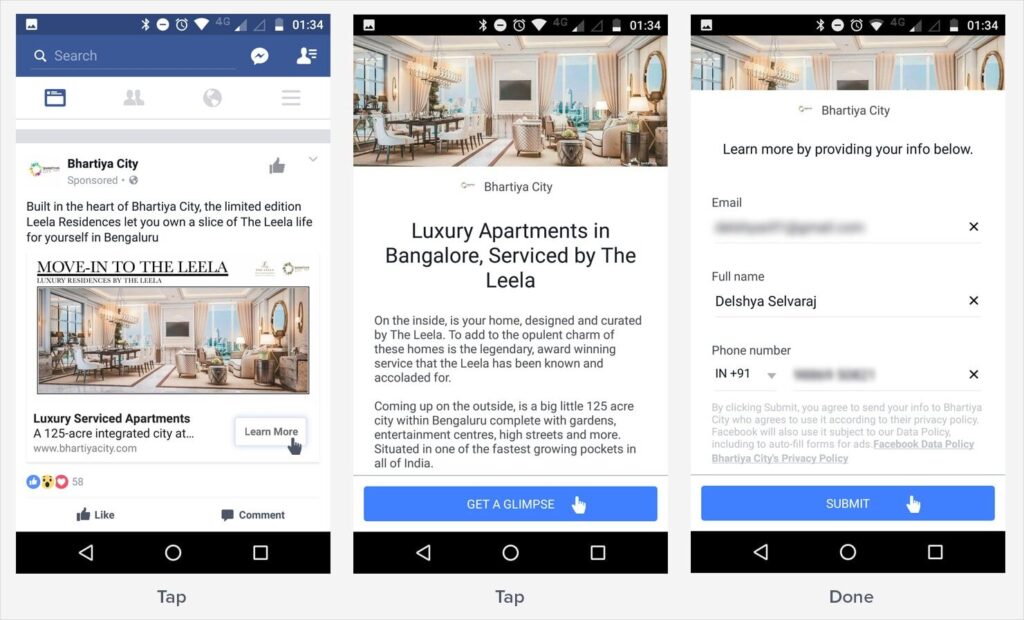
Facebook Lead Ads are a type of ad format designed specifically for lead generation. Instead of sending users to a landing page, the ad includes a native, mobile-optimized form that people can fill out directly within Facebook or Instagram.
Benefits of Facebook Lead Ads:
- Seamless user experience
- Pre-filled form fields (name, email, etc.)
- Mobile-friendly and fast-loading
- High conversion rates
- Easily integrated with CRM tools
How to Set Up Facebook Lead Ads with Forms
Here’s a quick step-by-step guide:
1. Choose Your Objective
When creating a new campaign in Facebook Ads Manager, select “Leads” as your campaign objective.
2. Set Up Your Targeting
Define your ideal audience by:
- Location
- Age
- Interests
- Behaviors
- Lookalike or Custom Audiences
3. Create the Lead Form
Facebook allows you to customize your form:
- Intro: Add a short message or headline.
- Form Fields: Include fields such as name, email, phone number, or custom questions.
- Privacy Policy: You must include a link to your privacy policy.
- Thank You Screen: Add a thank-you message or link to your website or download.
4. Design Your Ad
Use engaging visuals and a strong call-to-action like:
- “Get a Free Quote”
- “Sign Up Now”
- “Download Your Guide”
5. Publish and Monitor
Once your ad is live, monitor performance and test different creatives and form fields to optimize conversions.
Tips to Maximize Lead Quality
- Keep your form short: Fewer fields = higher completion rates.
- Use qualifying questions: Filter for more serious leads.
- Test different audiences: Don’t rely on one segment.
- Follow up quickly: Respond to leads within 24 hours.
- Integrate with your CRM: Use tools like Zapier or native integrations to send leads directly into your workflow.
Tracking Success
Track metrics like:
- Cost per lead (CPL)
- Lead form completion rate
- Conversion rate from lead to sale
Use Facebook Ads Manager and tools like Google Analytics or CRM reporting to measure ROI.
Final Thoughts
Generating leads with Facebook Ads and forms is one of the most cost-effective ways to grow your customer base — especially if you’re targeting mobile-first users. With the right setup, messaging, and follow-up strategy, you can turn casual scrollers into qualified prospects.
Ready to Start Generating Leads?
Want help setting up your first Facebook Lead Ad campaign? Contact us today for a free strategy session or download our Lead Ads Checklist to make sure you don’t miss a step.
Would you like this formatted into a downloadable PDF, email sequence, or social media post?